

From data to action: a unified service experience with the new Ticket Management
When a failure, an anomaly, or a configuration support need is detected, customers typically have to open a ticket through channels that are separate from the IoT platform or the custom DPS they use to monitor their equipment.
In this process, context is often lost. Manually transferring information between two systems is time-consuming and creates a fragmented experience for the customer, which can lead to frustration. The result is that the customer ends up describing the problem with inaccurate, incomplete, and subjective information, which is of little use to the service team.
To eliminate this gap and streamline service processes, we have integrated Ticket Management capabilities directly into the DPS. Customers can open a ticket in the DPS at the exact moment the need arises, while the service team manages all ticktes in the same environment they already use daily for remote diagnostics.
A better experience for the customer
Opening a ticket directly within the DPS improves the customer experience on multiple levels. Customers can request support without switching between applications and are guided by the information already available in the DPS to describe the issue more accurately and completely.
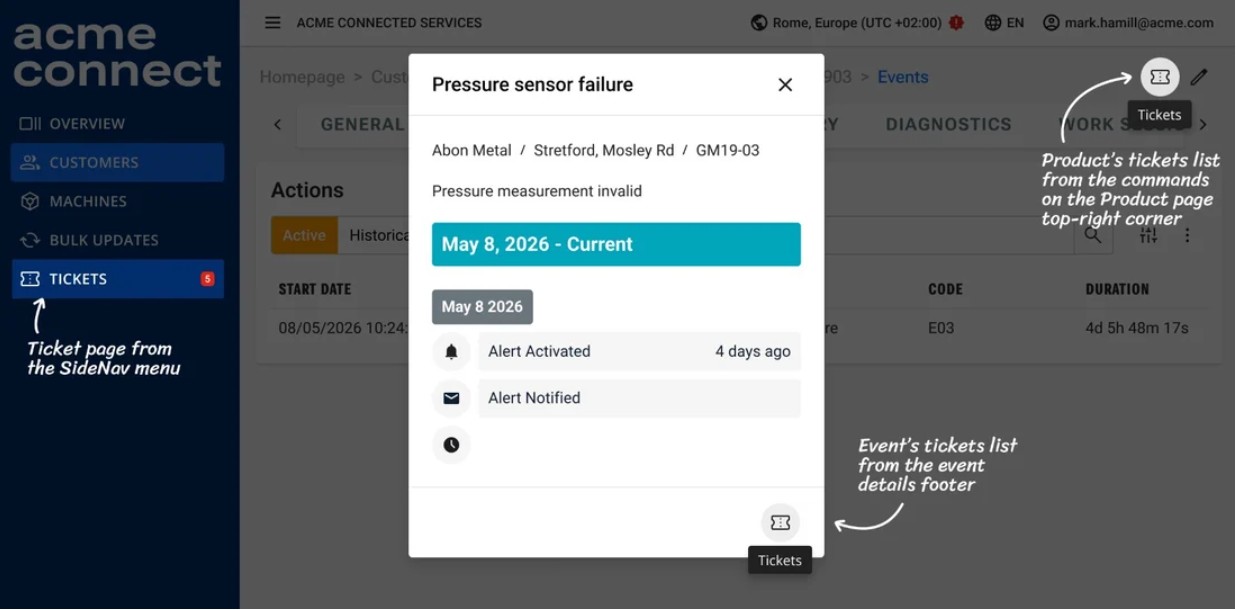
Ticket can relate to product configuration, routine maintenance, or be triggered by a specific event detected in the DPS, such as failures or anomalies. In the latter case, all relevant context — machine status, event, and associated data — is automatically attached to the ticket, along with any images or videos the customer may want to add. If a ticket is opened from the machine detail page, the customer can select the related event from the list, saving time.
All open tickets, along with their current status, are always visible on a dedicated page. This allows customers to avoid duplicate requests and monitor the status of their tickets in real time without having to contact the team again.
More efficient service processes for the service team
When a ticket is created, it is automatically assigned to the support team responsible for that customer.
The advantage for the technician handling it is the ability to view directly in the ticket the reason for the request and, if present, the event that triggered it. This means they always have the full picture without having to search manually or misinterpret the customer's report. Since they are already in the DPS, the technician also has direct access to all the platform information needed to plan the intervention, such as the maintenance log, spare parts, and machine performance insights.
The result is better organization and planning of service activities, with a tangible reduction in costs and response times.
A system designed for the entire service value chain
Traditional ticket management systems are designed to handle the direct relationship between the customer and a single service center.
In reality, service processes are often more complex: they involve the OEM, dealers, distributors, and technical service centers, all interacting with each other and with the end customer in often multi-layered scenarios.
To address this complexity, we designed Ticket Management to digitize service processes across the entire value chain: the organization, partners, dealers, distributors, and end customers.
It is possible to configure who is responsible for managing a ticket based on your business model: an external partner or the organization itself.
The partner will have visibility only on tickets related to their own customers and can, in turn, open a ticket toward the organization, always having a complete view of all the tickets they are managing in a single environment: those received from customers and those opened toward the organization.
The result is a structured, multi-level management approach where all communication stays within the platform, eliminating the need for external channels.
.jpg)
How to configure Ticket Management
Ticket Management is a ready-to-use feature: to enable it, simply configure the access permissions for the different user types.
If needed, you can customize ticket types and their properties, such as priority, directly from the Console.
Through plug-ins, you can also integrate external Ticket Management systems which, by connecting with the platform, allow you to create integrated processes with the tools you already use.
Give your customers a more efficient experience and service. Find out how to enable and customize your Ticket Management by requesting a demo.
-2.png)


