

Release your DPS into production with confidence and efficiency
What would happen if, following a release into production, your DPS stopped recognizing a certain type of failure or sent hundreds of notifications to your service team in a matter of minutes without there being a real problem?
As with any well-designed application, it is essential to test, validate, and release new DPS features in a structured way before deploying them to production.
To support this process, Servitly helps you adopt a testing, validation, and release workflow across three environments:
- DEVELOP – to freely experiment with and configure new features or modify existing ones.
- STAGING – to validate all new features and changes intended for production in a context that closely mirrors the real environment, leveraging Virtual Things.
- PRODUCTION – for release into production.
The Compare & Import Tool
To make porting between environments even easier, we introduced the Compare & Import tool in the Console.
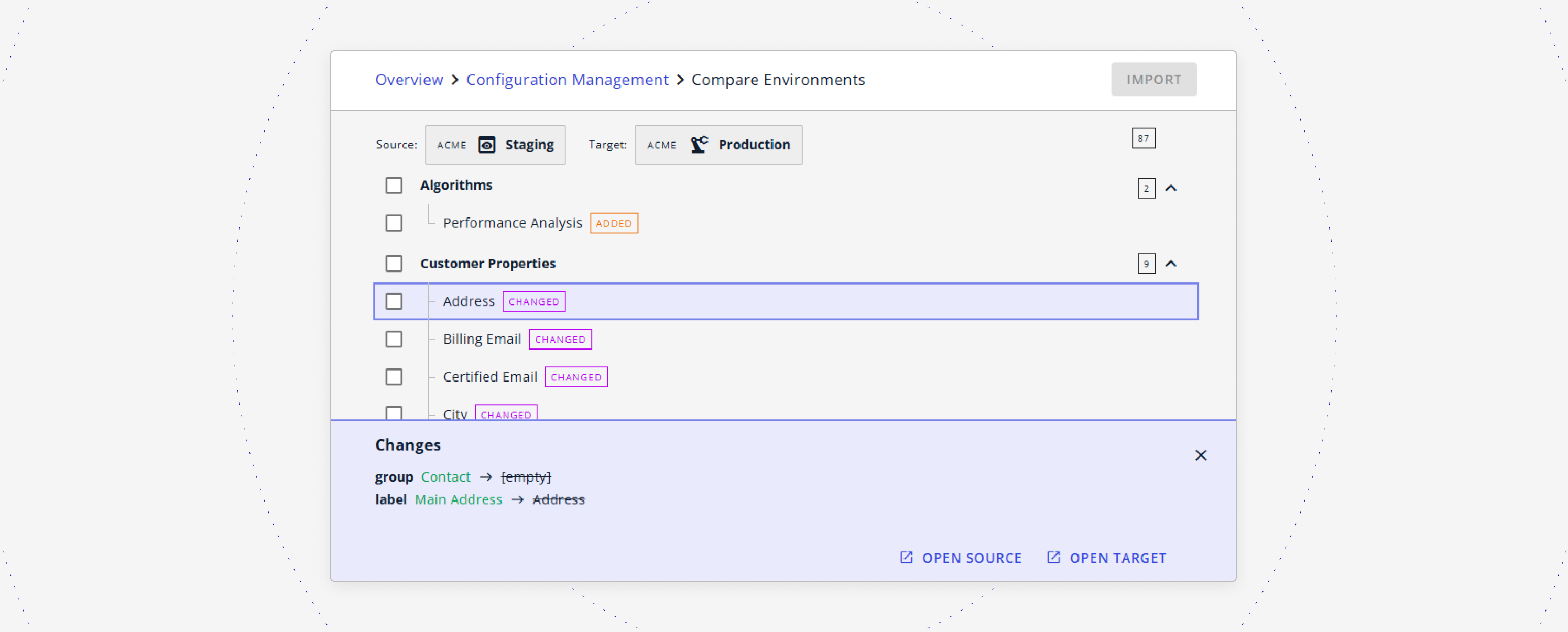
With this tool, you can:
- compare environments (e.g., STAGING vs. PRODUCTION) and clearly identify:
- new elements (algorithms, metrics, events, actions, etc.);
- content such as images, templates, JS, CSS;
- configuration changes to elements and features already in production;
- import only what you need, ensuring all necessary elements are included through a dependency-checking system that verifies the consistency of the target configuration before updating;
- adopt an incremental release policy by selecting specific changes to import without overwriting the entire configuration;
Leveraging environments together with the Compare and Import tool means increasing the quality of releases and accelerating the time-to-market of new features.
---
The Compare and Import tool is available within the Console.
---
Do you want to dive deeper into how Servitly can helps you manage the Configuration Lifecycle? Request a demo.
-2.png)


